“PuTTY” is a free and open source terminal emulator application which can act as a client for the SSH, Telnet, rlogin, and raw TCP computing protocols and as a serial console client. The name “PuTTY” has no definitive meaning, though “tty” is the name for a terminal in the Unix tradition.
With PuTTY you can connect to the G-Bar. The connection uses SSH, so is it not possible to use graphical programs. If you would like to get a graphical connection to the G-Bar you should use Thinlinc.
Getting PuTTY
PuTTY can be downloaded from:
- Homesite: download page.
Connecting to the G-Bar with PuTTY
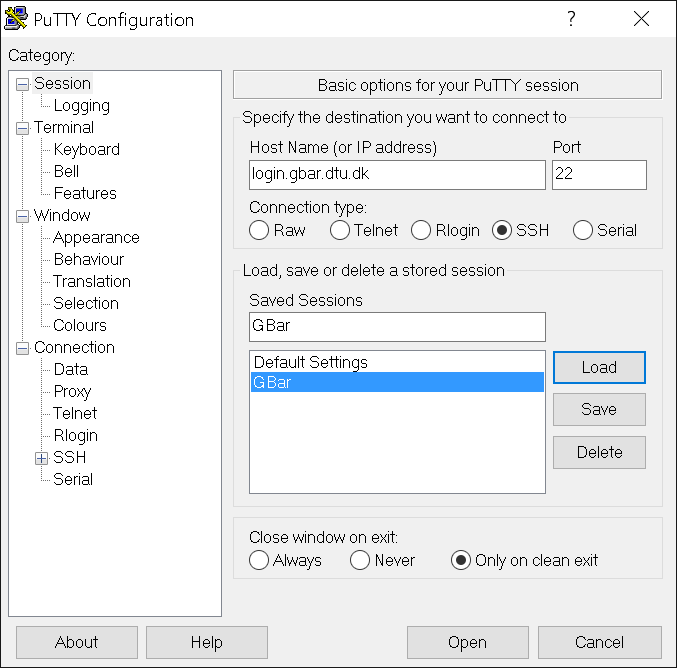
- Enter hostname of one of the G-Bar servers. For example login.gbar.dtu.dk
- Choose protocol: SSH
- You can save your connection information in Sessions by entering a name in “Saved Sessions” and click save. You can now quickly reconnect to this connection without having to retype the hostname.
- Click Open.
- Enter your username and password for the G-Bar.
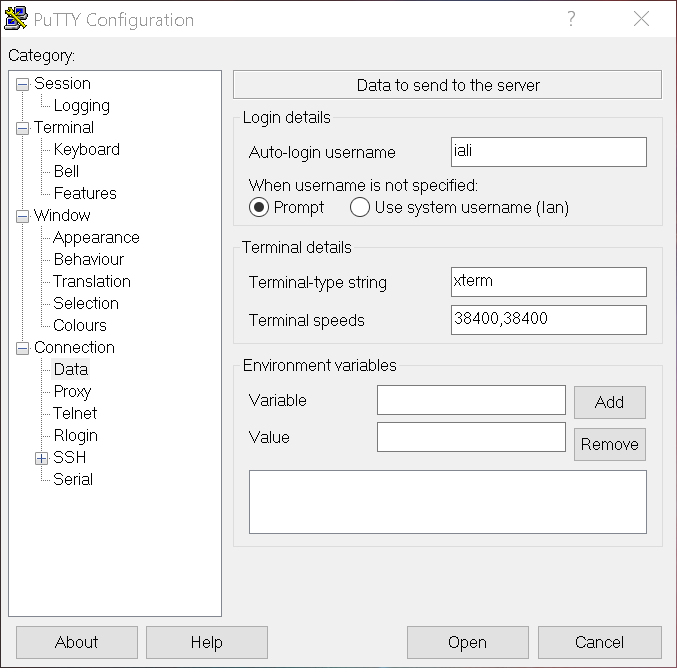
To save your username as part of the “Saved Session” you can do so under the “Data” menu on the left.
To create a Windows shortcut directly to a Saved Session create a new Shortcut with the following Target:
"C:\Program Files (x86)\putty\PUTTY.EXE" -load Gbar
You’ve now established an SSH connection to the G-bar. For further information take a look at the SSH page.